
The Meta-Prediction
How to always be ready when they ask "show me something"

Hello, it’s been a while.
You’re receiving this email because you subscribed to Social Magic Club newsletter. If you are new, at the end you’ll find links to some popular posts from the archive.
Today I want to share a practical presentation idea that uses a couple of new features introduced in the latest 2026 update of my app MultiNotes.
Imagine
You’re at a gathering. You’ve just met Jane, and at some point she finds out you’re into magic.
“Show me something,” she says.
“Interesting,” you reply. “I knew that this would happen.”
You pause.
“Imagine flipping a coin. What do you get?”
“Heads.”
“I knew it,” you say. “I knew that today I’d meet someone new, that she’d ask me to show her a trick, and that she’d choose heads.”
Then you add:
“I want you to check this. I am going to open my Notes app and I want you to read this note I made this morning.”
She takes your phone and reads:
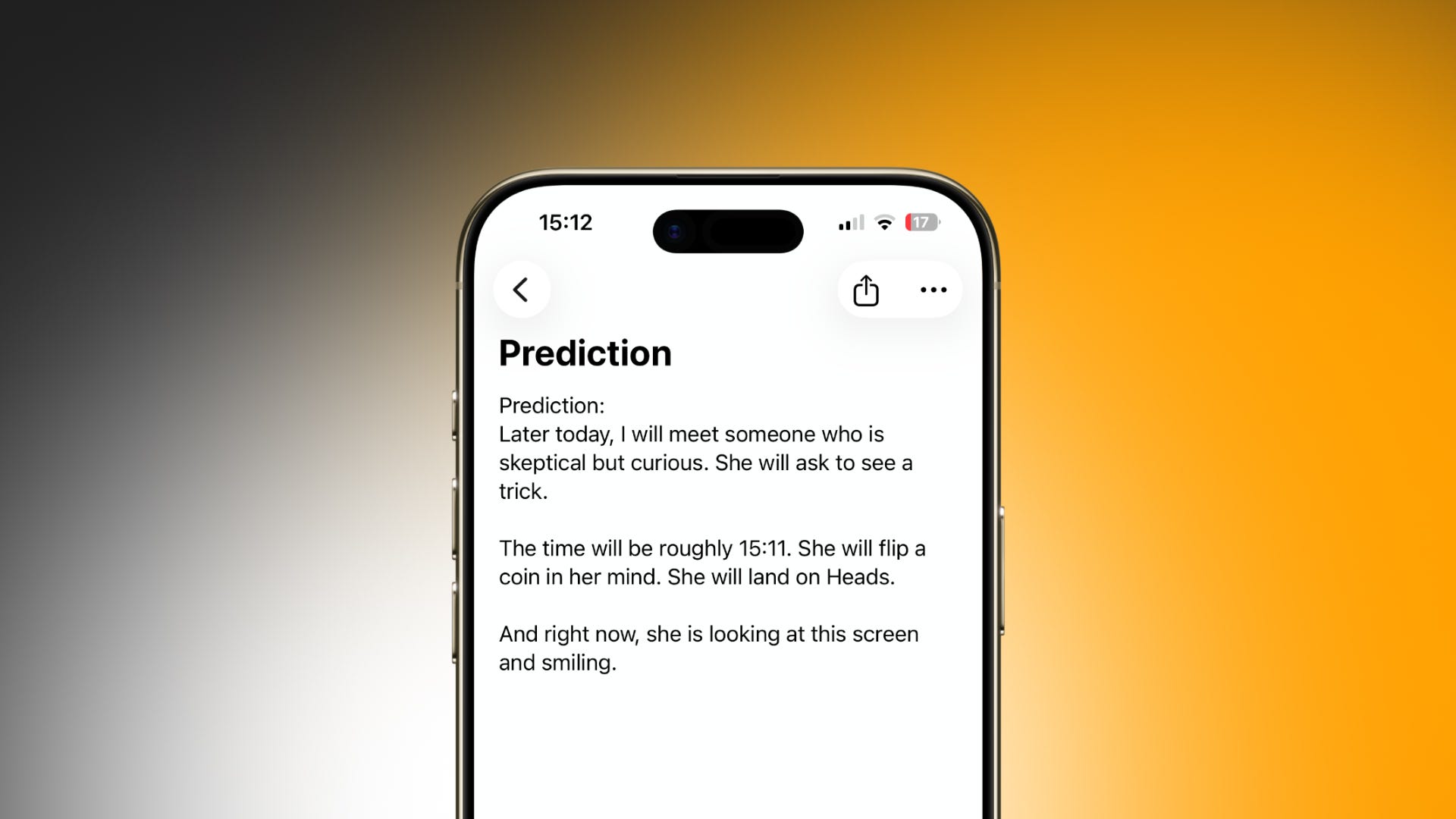
Prediction
Later today, I will meet someone who is skeptical but curious. She will ask to see a trick.
The time will be roughly 19:22. She will flip a coin in her mind. She will land on Heads.
And right now, she is looking at this screen and smiling.
Method
One of the best aspects of this trick is that it’s set up once and then lives on your phone permanently. There’s no preparation before or during the performance.
It’s always available for when someone asks you to show them a trick.
This relies on two newer features in MultiNotes (now fully compatible with iOS 26):
Auto-opening notes
You can now set a trick to open automatically when the app is launched.Dynamic time text (previously just for a secret group, now open to everyone)
You can insert dynamic time placeholders inside a note.Writing ((NOW)) displays the current time (e.g. 19:03).
Writing ((NOW-2)) displays the current time minus two minutes (e.g. 19:01).
Multiple Out Setup:
OUT 1: Man who flips heads.
OUT 2: Man who flips tails.
OUT 3: Woman who flips heads.
OUT 4: Woman who flips tails.
Disguising MultiNotes as Notes
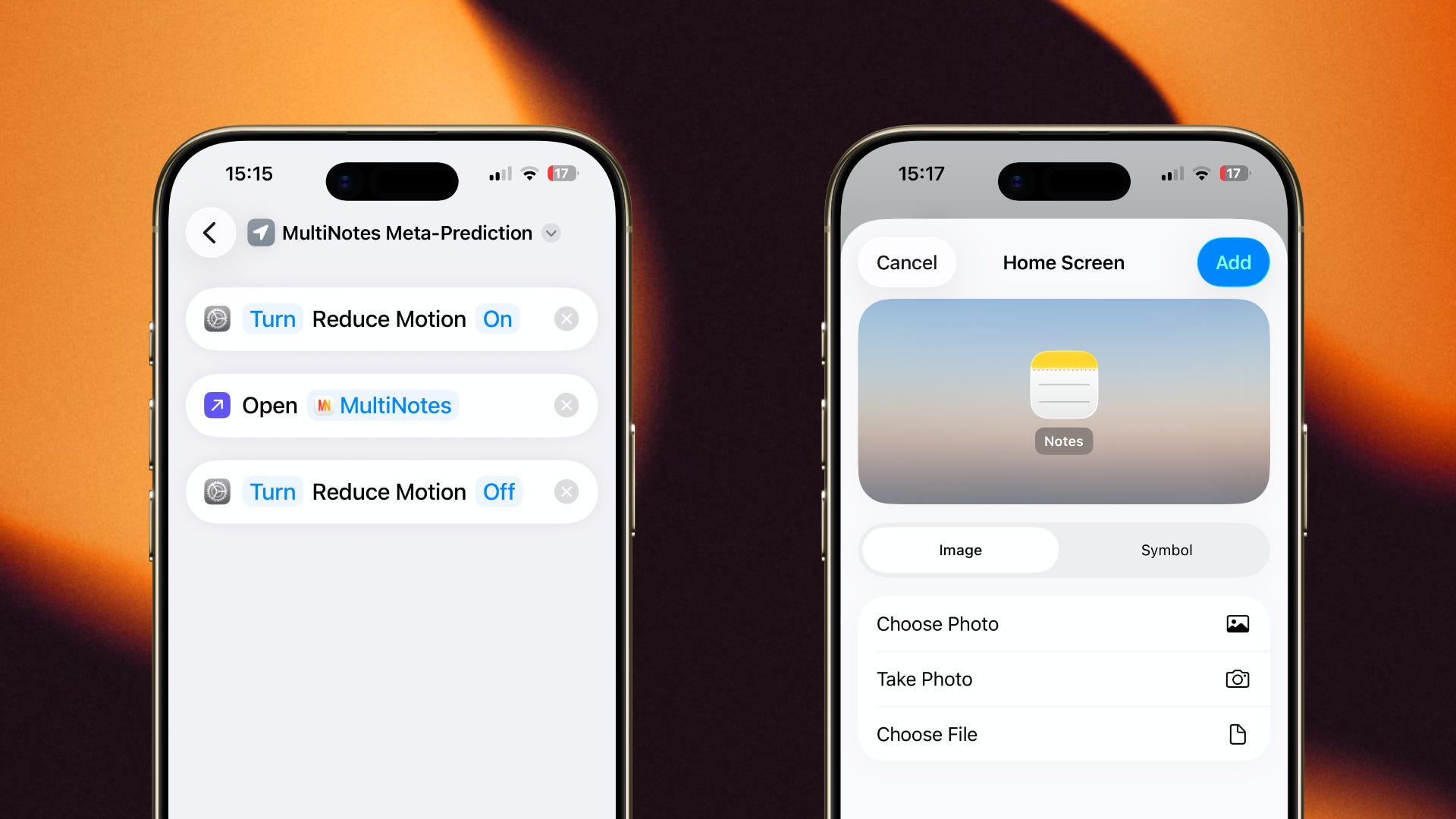
Here’s how you can make MultiNotes appear as the standard Notes app:
Create a new shortcut in the Shortcuts app
Add Set Reduce Motion to [ON] as the first action
Add Open App → MultiNotes as the second action
Add Set Reduce Motion to [OFF] as the third action
Change the Shortcut icon to something unassuming (for example, the Location icon)
Add to Home Screen
Rename to Notes and change the Home icon to an image of the real Notes icon.
For iPhones with a Dynamic Island
If you open the shortcut via Search instead of tapping the icon, you can avoid showing the shortcut badge. This will also surface the real Notes app, which you can hide by going to:
Settings → Apps → Notes → Search → Show App in Search → OFF.
Another presentation angle
Title: To Do List
Buy milk.
Pick up dry cleaning.
Leave the house.
Meet a curious woman.
Wait for her to ask to see a trick between 19:20 and 19:23.
Force her to say Heads.
Act surprised when it works.
MultiNotes Download Link
Download MultiNotes here: https://apps.apple.com/us/app/multinotes-multiple-outs/id6473738317
Popular posts of Social Magic Club
If you enjoyed this, here are some other posts from the archive:


App ideas?
I’m currently working on a few new apps.
If there’s a magic-related app you’ve always wished existed, or a tool you think would genuinely be useful for performers, I’d love to hear about it. Feel free to reply to this email with your idea, even if it’s rough or half-formed.
Antonio